
02 — Project sample
Jira Agent
Your team already runs its work in Jira, so that is where AI agents should start. Mention the agent in any issue and an answer from your own codebase appears in the same thread, built in days and safe by design.
- From idea to the first answer in Jira
- Days
- New tools for the team to learn
- None
- By default, every step checked
- Read-only
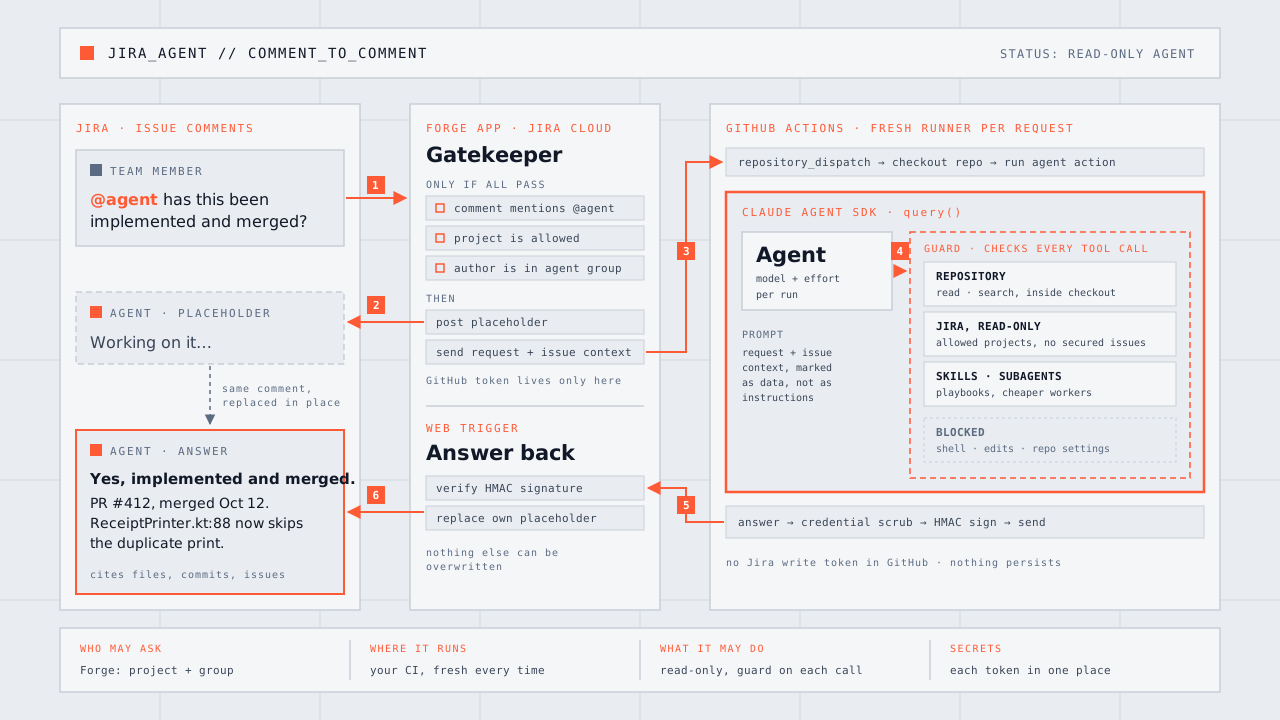
Every team that uses Jira already has its work written down in one place: what needs doing, why, who asked for it, what was discussed and what it is linked to. Jira is the project’s memory and its steering wheel. So when you bring AI agents into the company, Jira is not just one more integration. It is the most natural place to start.
Jira Agent puts an AI agent right there. Anyone on the team writes @agent and a question in an issue comment. A “working on it” note appears at once, and a few minutes later it is replaced by the answer, written from the actual codebase and the issue’s own history.
The challenge
Most AI tools ask people to go somewhere else: a chat window, a terminal, a new app. Then they have to copy the context over by hand, and the answer has to be copied back before anyone else sees it. For the people who drive projects, product owners and project managers, that is exactly where it stops being useful.
Running an agent on company code also raises three questions before any question about prompts. Who is allowed to ask? What is the agent allowed to touch? And where does it run, so that no laptop, personal access or long-lived secret is involved?
How we built it
Three small pieces, each doing one job:
- A Jira app. It watches for comments that mention the agent. It answers only in projects that are switched on and only for people in an approved group, and stays silent otherwise. When a request passes, it posts the placeholder and sends the request on, together with the issue’s description and latest discussion.
- Your own CI. The request starts a short job on a fresh GitHub Actions runner, next to the code. Nothing is kept between runs.
- The agent. It reads the code and the related Jira issues, follows links between them and writes an answer that cites files, commits and issues. The answer goes back to the Jira app, which replaces its own placeholder.
The first complete round trip, from a comment in Jira to an answer in the same thread, was working within days. The building blocks are mature: Atlassian’s app platform, GitHub Actions and Anthropic’s Claude Agent SDK. Most of the work is deciding what the agent may do, not making it do things.
Safe by design
An agent is only useful if people can trust it. Every step has one clear owner:
- Who may ask is decided in Jira: the project and the person’s group are checked before anything else happens.
- Where it runs is your own CI, on a fresh machine every time.
- What it may do is read. Every single action the agent takes is checked before it runs: it can read the code and the allowed Jira projects, and it skips restricted comments and confidential issues. It cannot run commands or change anything.
- Secrets each live in exactly one place. GitHub never holds a key that could write to Jira, and the answer is signed so that the Jira app accepts it only from your own run.
Widening what the agent can do is a deliberate, reviewed change to a short list, never a side effect.
Why not just use Rovo?
Atlassian has its own AI, Rovo, built into Jira. If it already does what your team needs, it is the simplest choice. Running your own agent pays off when the work goes deeper than the ticket:
- It runs where your code is. The agent works in your own CI, next to the repository, with your build, your tests and your tools. That is what makes it possible to go from a ticket to a tested pull request, not just a summary.
- Your models, your subscription. You choose the model for each task, a fast and inexpensive one for routine searching and a stronger one where judgment is needed, and you pay through the AI subscription you already have instead of another per-use meter.
- Your rules, in writing. What the agent may read and do is a short list in your own repository. It is reviewed like any other change and every action is checked against it.
- Your playbooks, your know-how. The instructions that make the agent good at your work live with your code and improve with every reviewed change. They stay yours whichever tools you use next.
- Any source, not just Atlassian’s. Error tracking, internal systems, documentation: anything with an API can become one more read-only tool for the agent.
What teams can ask
Because the agent sits where the questions already are, the useful requests are the everyday ones:
- “Has this been implemented?” Tickets often get done without anyone linking the work. The agent searches the merged history for it and answers with the pull request and the code.
- “Find related issues.” Duplicates and forgotten dependencies, listed with a one-line reason each.
- “Where in the code would this change go?” A starting point for estimation and planning, with file references.
- “Summarise this issue and its links.” A quick catch-up for anyone joining a discussion late.
From ticket to pull request
Answers are the safe first step. The real payoff comes when the agent also does the work. For a small, well-described issue, a product owner writes:
@agent fix this
and the rest follows the path every change in the team already takes:
- The agent picks up the issue. It reads the description, the discussion and the linked issues, and finds the relevant code.
- It makes the change on its own branch, on a fresh CI runner, never on anyone’s machine and never directly on the main line.
- It runs the project’s own tests and hands the result to a separate reviewer agent that checks the change without seeing the first agent’s reasoning.
- It opens a pull request linked to the issue, and replies in Jira with the link and a short summary of what changed and why.
- A person reviews and accepts it, exactly like any other pull request. The agent can propose; only people can merge.
- Your existing pipeline takes over. The merge triggers the same CI that already builds and deploys to staging, so the fix can be tried there within minutes of approval.
Nothing in this chain is new to the team. Jira stays the place where work is asked for, pull requests stay the place where changes are approved, and the deployment pipeline stays as it is. The agent simply fills the gap between “someone should fix this” and “here is a change ready to review”. Tickets that would have waited weeks for an hour of someone’s time now arrive as a pull request.
The same safety rules apply, widened by exactly one step: this flow may write to a branch and open a pull request, nothing more. It cannot merge, deploy or touch the main line.
Teaching the agent
New kinds of requests are taught to the agent as written playbooks, plain instructions kept next to the code, so the team improves the agent the same way it improves anything else: with a reviewed change. Cheaper, faster models handle the routine searching, and a stronger model is only used where judgment is needed.
Not using Jira?
Nothing here is specific to Jira. The idea is simple: the place where your team already plans its work is the place where the agent should be asked to help. Jira is just where this team happens to plan.
The same setup works with Linear, GitHub Issues, Azure Boards, GitLab, Asana or anything else that can notify another system when a comment is written. Only the small piece that listens for mentions and posts the answer changes. The agent, its rules, its playbooks and the CI it runs in stay exactly the same.
Results
The Jira app, the CI job and the read-only agent are in use, and the full loop works: mention, placeholder, agent run, answer. Next come the playbooks for the requests above, and then the ticket-to-pull-request flow: the same pipeline, with permission to write to a branch and open a pull request for people to review.
Something you need?
Consider this: You have hundreds of tickets in the backlog. Most of them are old and stay there forever. Only the critical tickets get done. This is simply because even a simple task can take an hour to complete. Using AI automation, such as described above, can change all this. Your team can delegate simple tasks to the AI agents to work with, straight from the Project Management tool such as JIRA. And you don’t even need to be a programmer to do this. When the skills, the agents use, are well written, the AI agents will handle the details and the best prompter is often the project manager who understands the validation criterias and stays on high level.
Get in touch with us, state your condition and let us propose a solution that will save you time and money!